INTRADAY MODE
Follow the session bias
Uses the session’s confirmed directional structure to permit only aligned entries. No clear bias means no new entries.
PROP-FIRM ACCOUNT PROTECTION FOR NINJATRADER 8
One tilt session can walk the balance into the trailing drawdown. One revenge-driven oversized day can put the account out of consistency. That is how an evaluation or payout path can unravel—not from one bad trade, but from the ten minutes after it. Trade Shield keeps the firm’s current rules and the protections you configure visible and enforced.
WRONG-WAY PROTECTION
Trade Shield reads the session as bullish, bearish, or no-trade and enforces it. Try to enter against the regime and the entry is blocked. If a blocked wrong-way entry fills before it can be stopped, Trade Shield closes the resulting exposure. A valid open trade is not closed just because the regime later changes. Rotation and other no-trade conditions mean stand down. The trend can’t run you over if you’re not allowed to fight it.
INTRADAY MODE
Uses the session’s confirmed directional structure to permit only aligned entries. No clear bias means no new entries.
SCALPING MODE
Requires the chart and its correlated market to confirm the same direction. If they diverge or stay neutral, new entries remain blocked.
Choose the mode that matches how you trade, so enforcement follows the market context you use.
Bullish
Bearish
Rotation
Trend days
Days sampled
In the published FLB regime sample, 70.48% of days carried a clear directional bias—the days that punish wrong-way entries hardest.
Historical FLB regime-classification sample. Descriptive only; not a forecast, performance claim, or guarantee of future market conditions.
WHAT TRADE SHIELD PROTECTS
The goal is to pass the evaluation, keep funded status, and protect payout eligibility. At partner prop firms Lucid Trading and Tradeify, the applicable drawdown, consistency, and daily-loss rules vary by account product and stage. Trade Shield enforces the firm rules and optional protections you configure—without treating a soft session lock like an account-ending breach. Paid-link disclosure: First Light Beacon may earn a commission if you sign up for or purchase an account through either link.
01
Keep the profit target, high-water mark, trailing floor, consistency requirement, and remaining risk in one clear view. Example: LucidPro $50K currently publishes a $2,000 maximum-loss amount; the active floor depends on the account’s high-water mark and lock state.
02
For account paths such as LucidPro and Tradeify Select, the trailing floor updates from the end-of-day balance. Trade Shield’s high-water-mark view and configured loss guardrails help keep the closing balance away from that floor. Tradeify’s established EOD floor is hard in real time; touching it intraday can fail the account.
03
The daily profit lock helps keep one runaway day from dominating total profit and pushing a pass or payout farther away. Going over consistency does not itself fail these account paths; it can delay passing or payout eligibility until the ratio is restored. Tradeify Select Evaluation and LucidPro funded accounts currently use a 40% consistency rule at their respective stages.
04
Trade Shield can warn, pause, or block new entries before a recovery sequence drives the account closer to its configured trailing-drawdown floor.
05
Session windows and position ceilings apply the firm’s applicable limits—or tighter protections you choose—before a late or oversized order reaches the account.
06
Apply the same account-level limits to discretionary decisions and automated strategy activity.
REAL-TIME TILT PROTECTION
Every trader has a plan for the good trades. Accounts are won or lost in the few minutes after a red one. Trade Shield watches that window for you—so the disciplined decision you made this morning is still the one running this afternoon. You keep the wins; it guards the line.
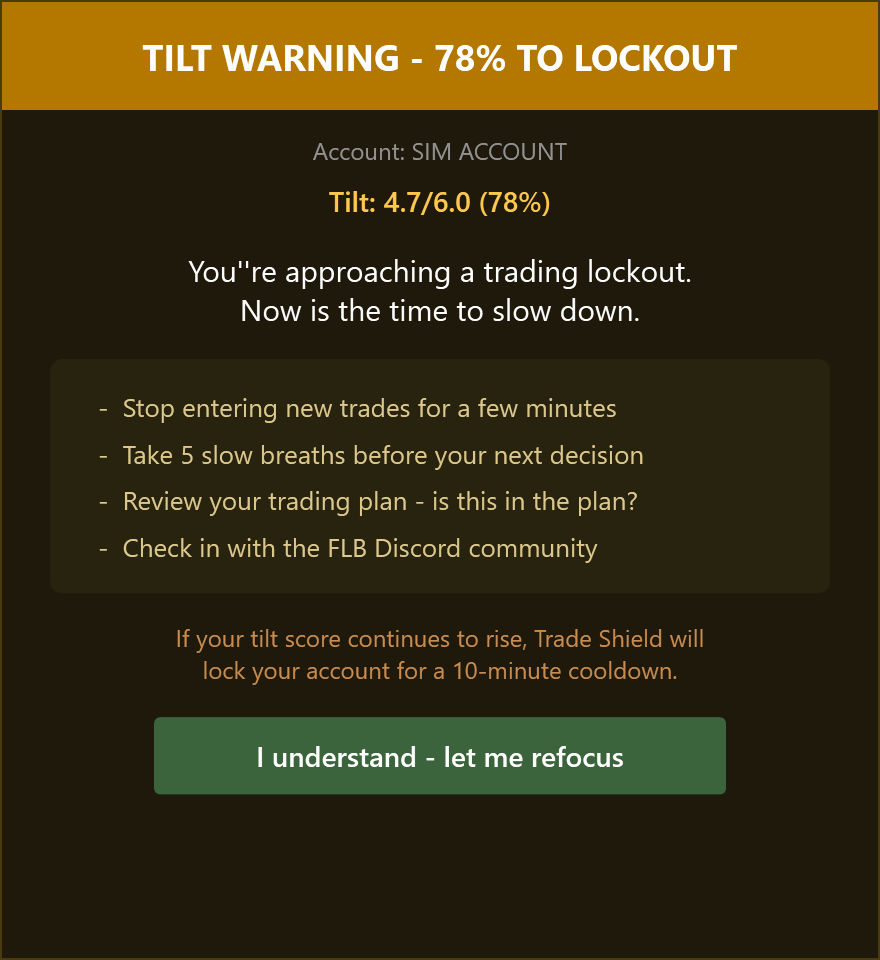
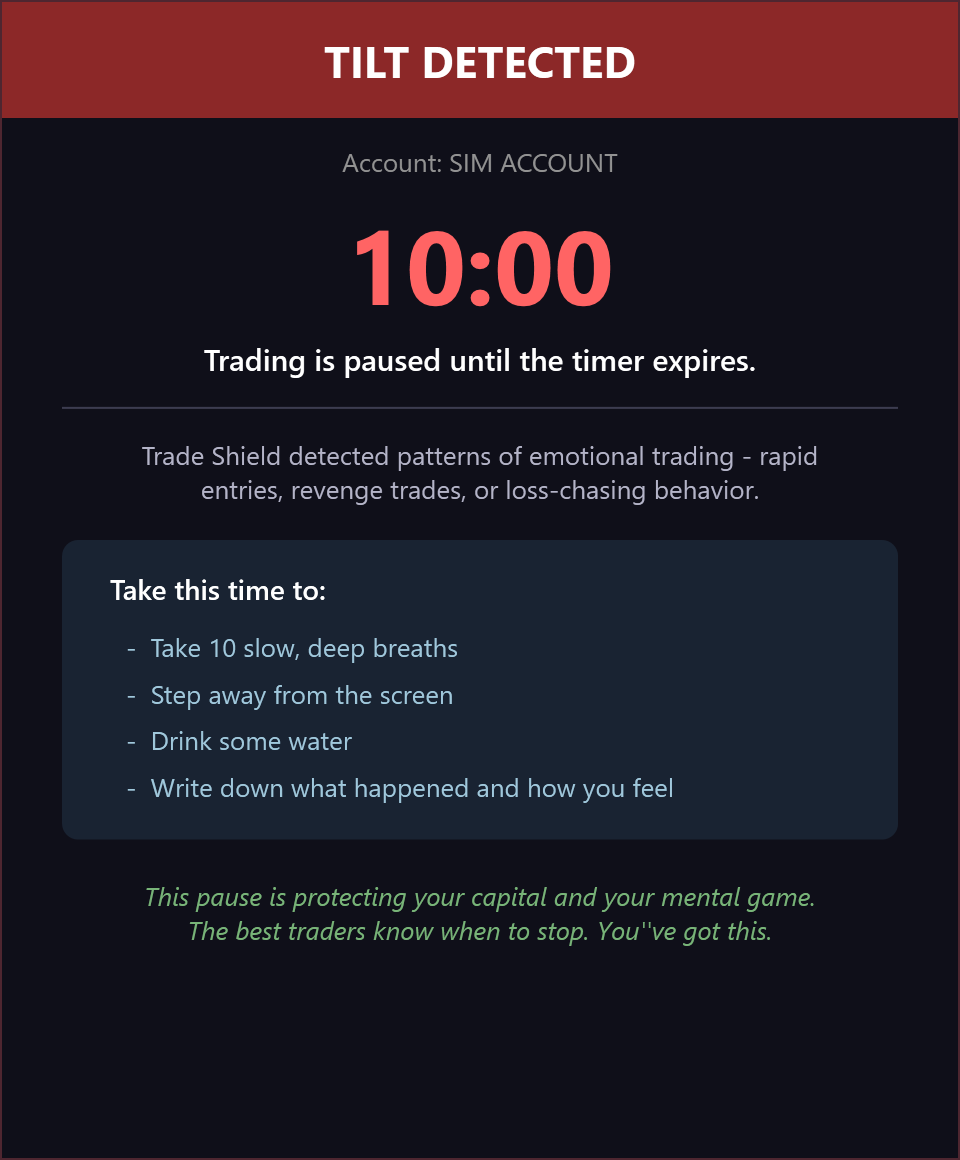
Trade Shield updates your session score as each trade closes against a standard tilt lock line of 6.0. It reads the patterns every trader knows the feel of—rapid re-entries, revenge trades, loss-chasing—and as the score reaches 75% of the active line, it gives you a heads-up. Keep pushing and it steps in: open risk is flattened, new entries pause, and a 10-minute cooldown lets the moment pass. Then new-entry permissions return and the behavioral scores reset.
Recognizes the patterns that show up right after a loss before they compound into another entry.
At 75% of the active lock line, it raises the warning—the pause between impulse and order the calm version of you would want.
At the lock line, Trade Shield flattens open positions and blocks new exposure for a 10-minute cooldown. Valid exits and reductions remain permitted.
WHAT IT CATCHES FOR YOU
Adds the rapid re-entry to the live score and raises the warning when the active line reaches 75%.
Scores the loss-chasing size increase; the position ceiling you configured remains the hard cap.
The configured daily guard moves open risk off and stops new entries for the session.
Scores the acceleration and checks the session against the active warning and lock lines.
Risk can always come off. When tilt protection activates, Trade Shield flattens open positions, then pauses new exposure for 10 minutes. Valid exits and reductions remain allowed.
The desks call this risk governance. Now it’s running on your account.
CONNECTION COMPATIBILITY
Trade Shield works with eligible accounts exposed inside NinjaTrader 8, including direct NinjaTrader connections and supported Rithmic-enabled broker and FCM connections.
01 / NINJATRADER CONNECTIONS
02 / RITHMIC BROKER NETWORK
Connection availability depends on your NinjaTrader license, broker or FCM permissions, and account configuration. Your account must be visible and enabled inside NinjaTrader 8. Confirm your exact setup before purchase. NinjaTrader connection guide Rithmic broker directory
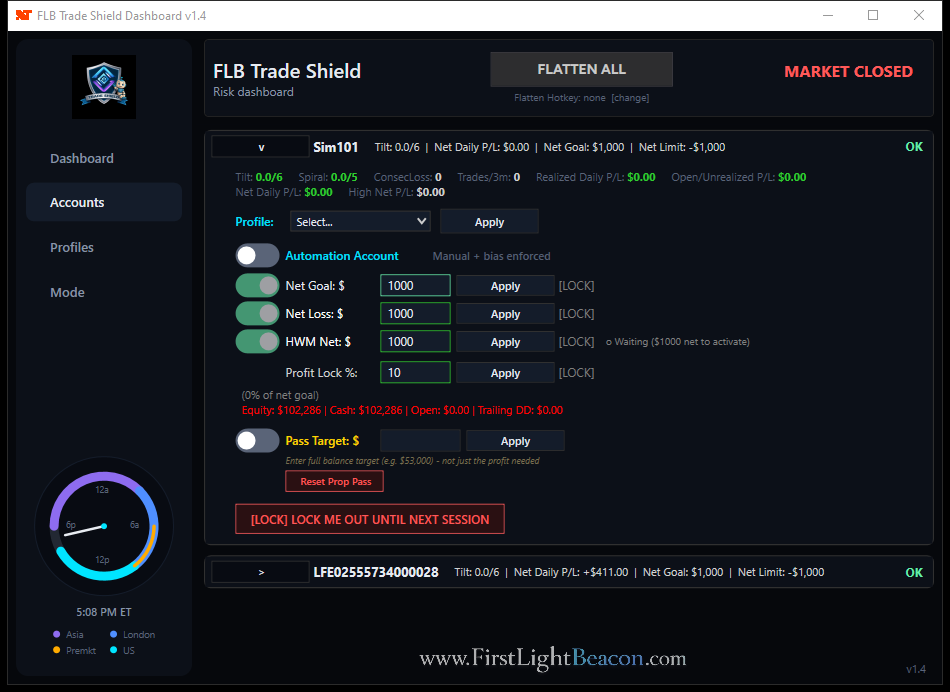
ACCOUNT PROTECTION, IN ONE VIEW
PROTECT THE ACCOUNT YOUR WAY
Choose Trade Shield on its own, or get it as part of FLB Suite or FLB Pro. In every plan, its job is the same: apply the firm rules and optional protections you configured before one more trade puts the account path at risk.
 FIRST LIGHT BEACONTRADE SHIELDSTANDALONE · SUITE · PRO
HOW TRADERS PROTECT THE ACCOUNT
Use the go-or-no-go check before entry. Directional conditions permit participation; rotation keeps avoidable risk away from the account.
Define high-water-mark and maximum-loss guardrails before the session begins, then keep the active floor visible as the balance changes.
Use the daily profit lock to help keep one oversized winning day from pushing the pass or payout farther away.
Tilt and session controls keep recovery entries and off-hours orders from adding avoidable risk to the account.
EVALUATION + FUNDED-ACCOUNT PROTECTION
Get the complete Trade Shield dashboard and risk engine for NinjaTrader 8, built to apply configured firm rules and optional account protections before one bad stretch compounds.
A failed evaluation can cost the fee. A lost funded account can end future payout eligibility. Trade Shield is $29.99/mo.
Secure purchase and subscription management are provided by Whop. Pricing shown in USD.
SECURE CHECKOUT
Secure payment and subscription management are provided by Whop. If the embedded checkout is unavailable, open checkout in a new tab.
BEFORE YOU PROTECT THE ACCOUNT
Yes. Trade Shield is available standalone for $29.99 per month. It is also included with FLB Suite and FLB Pro.
No. Trade Shield is a behavioral risk and account-governance layer. Every open position still needs an appropriate protective stop and responsible oversight.
Trade Shield keeps pass-target progress, high-water-mark protection, trailing drawdown, and applicable account constraints visible and governed. Exact rules vary by Lucid Trading or Tradeify product and stage, so configure the current published rules for your account.
Yes. Automation-account controls allow the same account-level guardrails to govern automated order flow.
PROTECT THE ACCOUNT BEFORE THE NEXT SESSION